
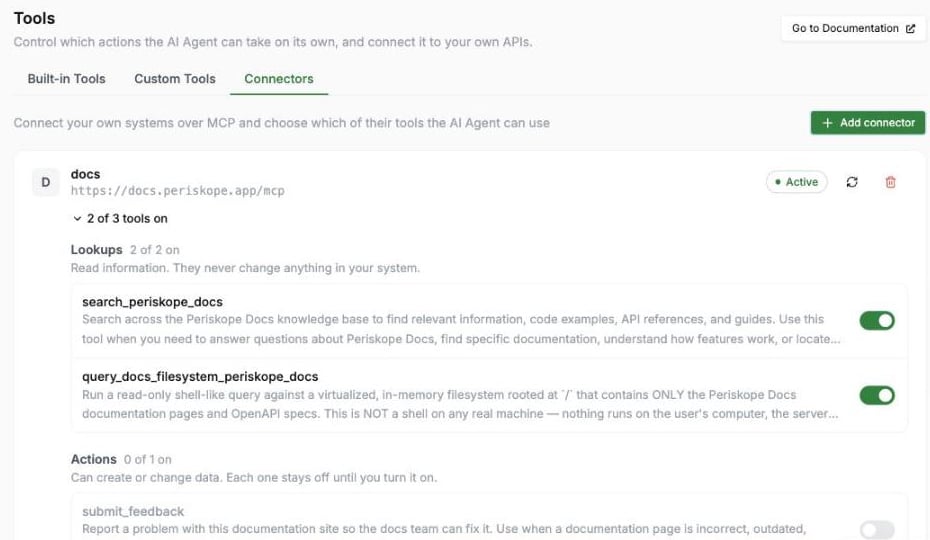
Connectors
Connectors require a Pro plan, and the AI Agent must be enabled before you can add one.
Add a Connector
Click Add connector and provide:- Name: A label to identify the connector (e.g. “Company Docs”)
- MCP server URL: The MCP server’s endpoint (e.g.
https://docs.company.com/mcp). It must be a publichttpsaddress — private and local addresses are rejected. - Authentication: How Periskope signs in to the server
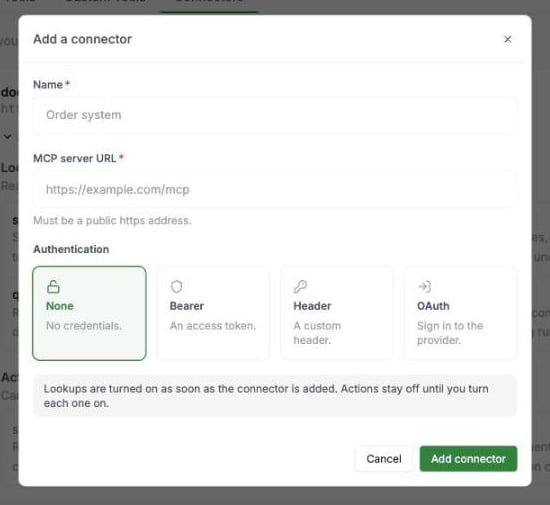
Add a connector
You can connect up to 5 connectors per organization.
Lookups and Actions
Once connected, Periskope discovers the tools the server offers and sorts them into two groups. Expand a connector to see them and switch individual tools on or off.
A connector can have up to 100 tools switched on.
Periskope uses the read-only marking the server publishes for each tool. If a server doesn’t publish one, Periskope goes by the tool’s name — names that start with a reading word such as
search, get, list, read or fetch count as Lookups.
How the AI Uses Actions
- The AI can only call tools you’ve switched on, and only when the conversation calls for it.
- The AI never repeats the same action with the same details in a conversation, so a customer’s request isn’t carried out twice.
- If a connector doesn’t confirm an action in time (calls time out after 10 seconds), the AI doesn’t try again. It tells the customer your team will confirm. Check the connected system to see whether the action went through.
- If an action returns an error, the AI reads it and can correct the details and try once more.
- Anything a connector returns is treated as information, never as instructions the AI must follow.
Manage a Connector
- Refresh re-syncs the tool list after the server’s capabilities change. Your on/off choices for existing tools are kept.
- Disconnect removes the connector entirely.
- If a connection using OAuth expires or is revoked, the connector is marked Needs re-auth. Click Reconnect to sign in again.
Next Steps
- Custom Tools - Connect the AI to your own HTTP APIs
- Built-in Tools - Configure native AI actions like creating tickets and private notes
- Knowledge Base - Train the AI with FAQs and documents