> ## Documentation Index
> Fetch the complete documentation index at: https://docs.periskope.app/llms.txt
> Use this file to discover all available pages before exploring further.
# Triggers
## Overview
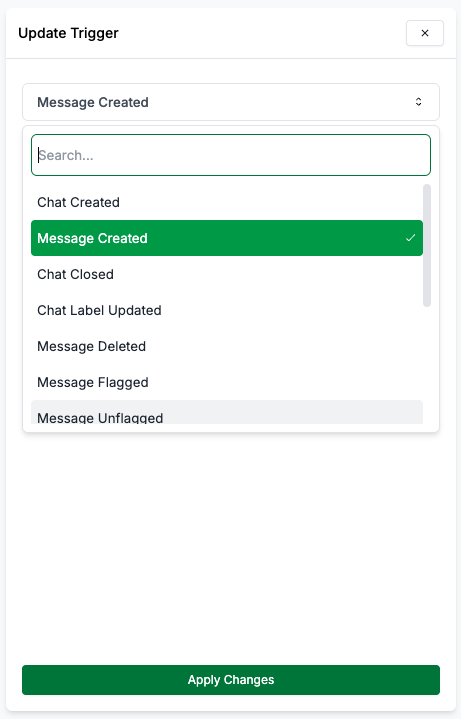
Triggers are events or notifications generated by the system or users that initiate the execution of a workflow. They act as the starting point of an automation workflow.
Available Triggers:
When a new chat/ group is created.
The list of organization phone numbers that are allowed to trigger the
workflow.
When a label is added or removed from a chat.
The list of organization phone numbers that are allowed to trigger the
workflow.
When a reaction is added to a message.
The list of organization phone numbers that are allowed to trigger the
workflow.
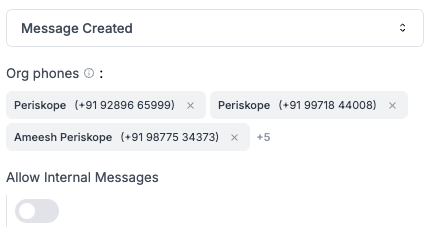
When a new message is received in a chat from an external number or internal number (if enabled). You can choose to trigger the workflow when a new message is received from an
external number or internal number (if enabled).
The list of organization phone numbers that are allowed to trigger the workflow.
Allow messages from internal numbers to trigger the workflow.
 When a message is edited/ updated.
The list of organization phone numbers that are allowed to trigger the workflow.
When a message is flagged by AI or manually by a user.
The list of organization phone numbers that are allowed to trigger the workflow.
When a message is unflagged by AI or manually by a user.
The list of organization phone numbers that are allowed to trigger the workflow.
When a message is deleted in a chat.
The list of organization phone numbers that are allowed to trigger the workflow.
When a new ticket is created on Periskope.
When a ticket property is updated. For e.g. subject, status, priority, due date etc.
When a label is added or removed to a ticket.
When a ticket is closed.
When a new task is created.
When a task is assigned to a user.
When a message is edited/ updated.
The list of organization phone numbers that are allowed to trigger the workflow.
When a message is flagged by AI or manually by a user.
The list of organization phone numbers that are allowed to trigger the workflow.
When a message is unflagged by AI or manually by a user.
The list of organization phone numbers that are allowed to trigger the workflow.
When a message is deleted in a chat.
The list of organization phone numbers that are allowed to trigger the workflow.
When a new ticket is created on Periskope.
When a ticket property is updated. For e.g. subject, status, priority, due date etc.
When a label is added or removed to a ticket.
When a ticket is closed.
When a new task is created.
When a task is assigned to a user.