> ## Documentation Index
> Fetch the complete documentation index at: https://docs.periskope.app/llms.txt
> Use this file to discover all available pages before exploring further.
# Conditions
## Conditions
Conditions define the conditions that must be met for the actions to be executed. They allow for logical combinations of conditions using AND/OR operations and can include nested conditions up to a depth of 2.
Support for logical groupings: e.g., (1 OR 2) AND (3).
**Condition groups:**
You can group conditions together as a single unit to create complex grouped conditions. For example, you can group conditions 1 and 2 together and then combine them with condition 3.
**Delay before conditions evaluation**:
Specify delays in seconds, minutes, or hours before checking conditions.
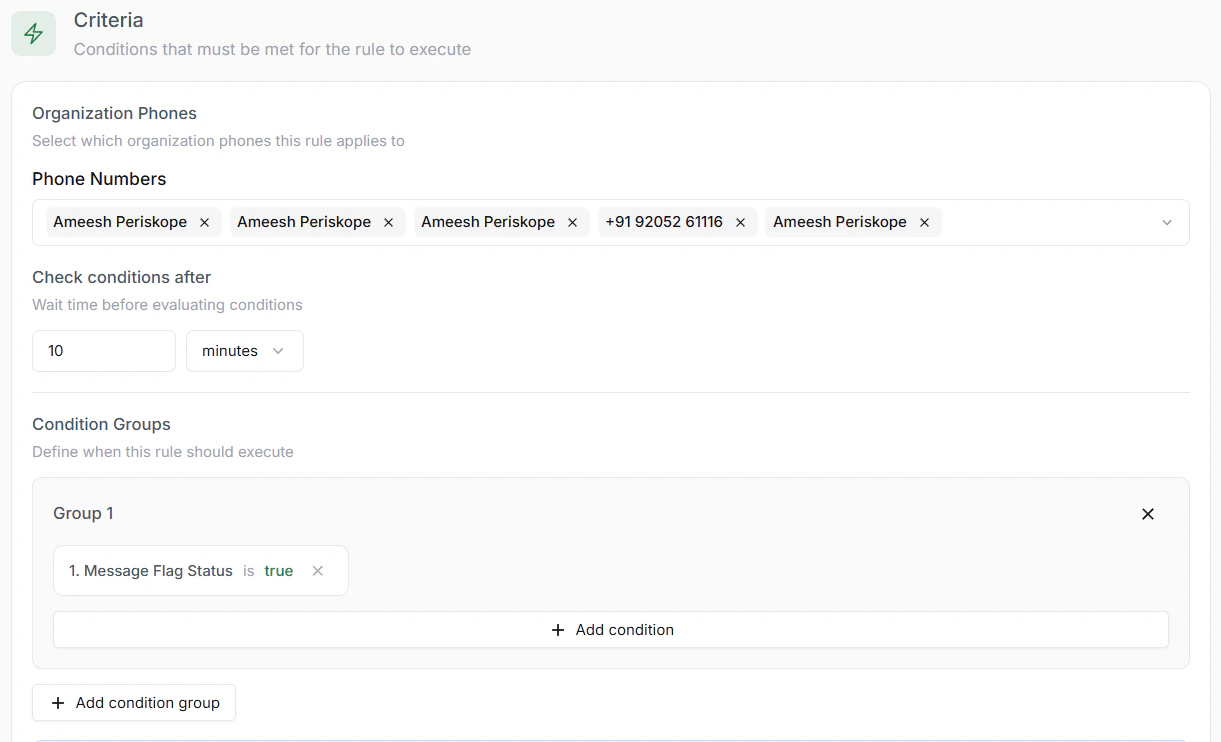 Conditions can involve multiple variables, such as keywords in a message properties, ticket properties, or chat properties, labels etc.
## Types of Variables (Properties):
* **Message Properties**: Conditions based on message properties such as message body, message type, message sender, etc.
* **Ticket Properties**: Conditions based on ticket properties such as ticket status, ticket priority, ticket assignee, etc.
* **Chat Properties**: Conditions based on chat properties such as chat status, chat assignee, etc.
* **Reaction Properties**: Conditions based on reaction properties such as reaction, reaction sender, etc.
## Types of Conditions:
**Variable Conditions**:
* **Equals**: Checks if the value of the property is equal to the specified value.
* **Not Equals**: Checks if the value of the property is not equal to the specified value.
* **Contains**: Checks if the value of the property contains the specified value.
* **Not Contains**: Checks if the value of the property does not contain the specified value.
* **Starts With**: Checks if the value of the property starts with the specified value.
* **Ends With**: Checks if the value of the property ends with the specified value.
* **Is Known**: Checks if the value of the property is known or has a value (not null, undefined or empty).
* **Is Unknown**: Checks if the value of the property is unknown (null, undefined or empty).
* **Less Than**: Checks if the value of the property is less than the specified value (time, date, number).
* **Less Than or Equals**: Checks if the value of the property is less than or equal to the specified value (time, date, number).
* **Greater Than**: Checks if the value of the property is greater than the specified value (time, date, number).
* **Greater Than or Equals**: Checks if the value of the property is greater than or equal to the specified value (time, date, number).
* **Is**: Checks if the value of the property is the specified value (either text, days or boolean).
* **Not Is**: Checks if the value of the property is not the specified value (either text, days or boolean).
* **On**: Checks if the value of the property is on the specified day.
**Group Conditions**:
* **AND**: All conditions must be met.
* **OR**: Any one of the conditions must be met.
Conditions can involve multiple variables, such as keywords in a message properties, ticket properties, or chat properties, labels etc.
## Types of Variables (Properties):
* **Message Properties**: Conditions based on message properties such as message body, message type, message sender, etc.
* **Ticket Properties**: Conditions based on ticket properties such as ticket status, ticket priority, ticket assignee, etc.
* **Chat Properties**: Conditions based on chat properties such as chat status, chat assignee, etc.
* **Reaction Properties**: Conditions based on reaction properties such as reaction, reaction sender, etc.
## Types of Conditions:
**Variable Conditions**:
* **Equals**: Checks if the value of the property is equal to the specified value.
* **Not Equals**: Checks if the value of the property is not equal to the specified value.
* **Contains**: Checks if the value of the property contains the specified value.
* **Not Contains**: Checks if the value of the property does not contain the specified value.
* **Starts With**: Checks if the value of the property starts with the specified value.
* **Ends With**: Checks if the value of the property ends with the specified value.
* **Is Known**: Checks if the value of the property is known or has a value (not null, undefined or empty).
* **Is Unknown**: Checks if the value of the property is unknown (null, undefined or empty).
* **Less Than**: Checks if the value of the property is less than the specified value (time, date, number).
* **Less Than or Equals**: Checks if the value of the property is less than or equal to the specified value (time, date, number).
* **Greater Than**: Checks if the value of the property is greater than the specified value (time, date, number).
* **Greater Than or Equals**: Checks if the value of the property is greater than or equal to the specified value (time, date, number).
* **Is**: Checks if the value of the property is the specified value (either text, days or boolean).
* **Not Is**: Checks if the value of the property is not the specified value (either text, days or boolean).
* **On**: Checks if the value of the property is on the specified day.
**Group Conditions**:
* **AND**: All conditions must be met.
* **OR**: Any one of the conditions must be met.