> ## Documentation Index
> Fetch the complete documentation index at: https://docs.periskope.app/llms.txt
> Use this file to discover all available pages before exploring further.
# Knowledge Base
> Train your AI Agent with FAQs, documents, and self-learned context for accurate, reliable responses
## Knowledge Base
The Knowledge Base is where you teach your AI Agent what to know and how to answer customer questions. Access it through **AI** > **Knowledge Base**.
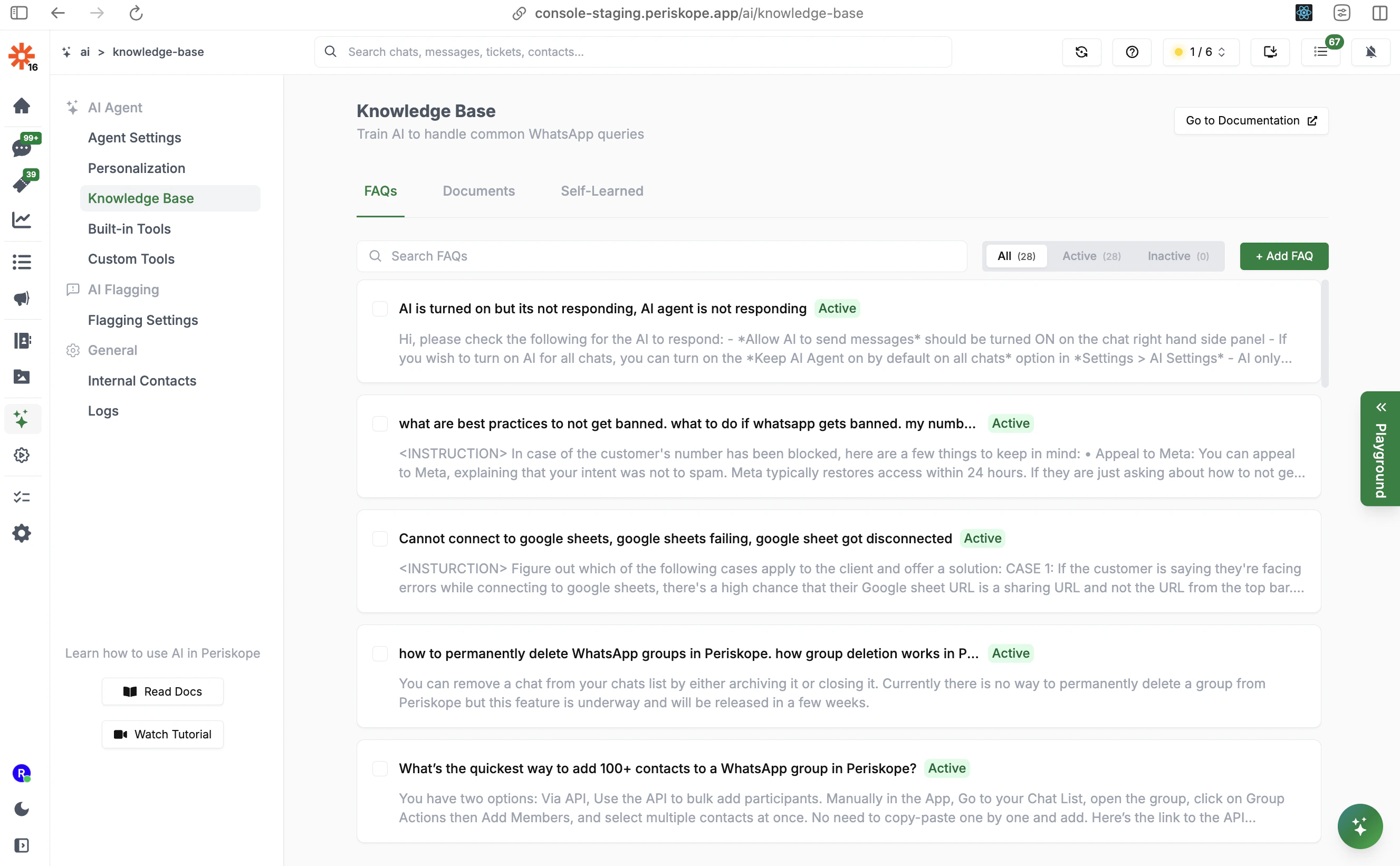
There are three ways to train the AI:
| Method | Best For |
| ---------------- | ------------------------------------------------------------------- |
| **FAQs** | Specific questions with precise answers and behavioral instructions |
| **Documents** | Large bodies of reference content (product info, policies, guides) |
| **Self-Learned** | Q\&A pairs the AI discovers automatically from real conversations |
***
## FAQs
FAQs are essentially **prompts for the AI Agent**. Each FAQ entry has three components:
* **Question(s)**: The customer query — add multiple variations so the AI can match different phrasings
* **Answer**: The response the AI should provide
* **Instructions**: Special behavioral guidance for this specific FAQ (optional)
### Writing Effective Questions
Add multiple variations of the same question so the AI can identify it regardless of how customers phrase it:
```text theme={null}
How much does your service cost?
What are your pricing plans?
Can you tell me about your subscription fees?
How much does it cost per month?
```
The more variations you add, the more reliably the AI will match incoming questions to the right FAQ entry.
### Writing Effective Answers
Keep answers concise but complete. Use bullet points for multi-step or multi-item responses. Include links where relevant.
```text theme={null}
Our service has three tiers:
- Basic: $10/month — includes core features
- Pro: $25/month — includes advanced analytics and integrations
- Enterprise: Custom pricing — contact sales@company.com
```
### Using Instructions for Controlled Responses
The **Instructions** field lets you add behavioral rules specific to this FAQ — without affecting the rest of the AI's behavior.
**Basic instructions:**
```text theme={null}
Ask for the user's account email before providing specific account details.
```
**Conditional instructions:**
```text theme={null}
If the user mentions an error code, ask for a screenshot before troubleshooting.
If the user asks about pricing, confirm their region first.
```
**Multi-turn / escalation instructions:**
```text theme={null}
If they are facing issues adding a new user and appear to have hit their user limit,
explain that they may need to upgrade their plan. Ask if that's the case, and if so,
direct them to Settings > Manage Plans or notify the sales team to step in.
```
FAQs are evaluated as prompts by the AI model. Writing clear, specific instructions produces far better results than vague guidance. If an FAQ isn't working as expected, try being more explicit in the Instructions field.
### FAQ Best Practices
* **Include multiple question variations** — different phrasings, abbreviations, and common misspellings
* **Keep answers factual** — the AI will not fabricate information, but vague answers lead to vague responses
* **Use instructions for edge cases** — handle follow-up logic, escalations, and conditional behavior here
* **Review regularly** — add new FAQs for recurring questions you see in conversations
***
## Documents
Documents let you upload large bodies of reference content that the AI searches when answering questions. This is ideal for:
* Product documentation
* Company policies and procedures
* Pricing sheets
* Onboarding guides
* Technical specifications
### Recommended Document Formats
**1. Q\&A Format (Most Effective)**
Structure content as question-answer pairs. This directly mirrors how the AI processes queries and produces the most reliable results.
```text theme={null}
Q: How do I reset my password?
Ans: Go to the login page and click "Forgot Password". Enter your email address
and you'll receive a reset link within 5 minutes.
Q: What payment methods do you accept?
Ans: We accept Visa, Mastercard, American Express, PayPal, and bank transfers
for enterprise accounts.
```
**2. Paragraph Structure**
Group related information into focused paragraphs with clear headings:
```text theme={null}
[Product Features]
Our platform includes real-time analytics, custom reporting, and team
collaboration tools. All features are accessible from the dashboard.
[Security]
We implement industry-standard encryption for all data. Servers are hosted
in ISO-certified data centers with 24/7 monitoring and SOC 2 compliance.
```
**3. List Structure**
Use bullet points for step-by-step instructions or feature lists:
```text theme={null}
[Getting Started]
- Sign up with your email address
- Verify your email through the confirmation link
- Complete your profile setup
- Connect your first integration
- Invite team members
```
The AI searches documents for relevant sections when answering questions. Well-structured documents with clear headings and labeled sections produce better results than unformatted walls of text.
***
## Self-Learned Context
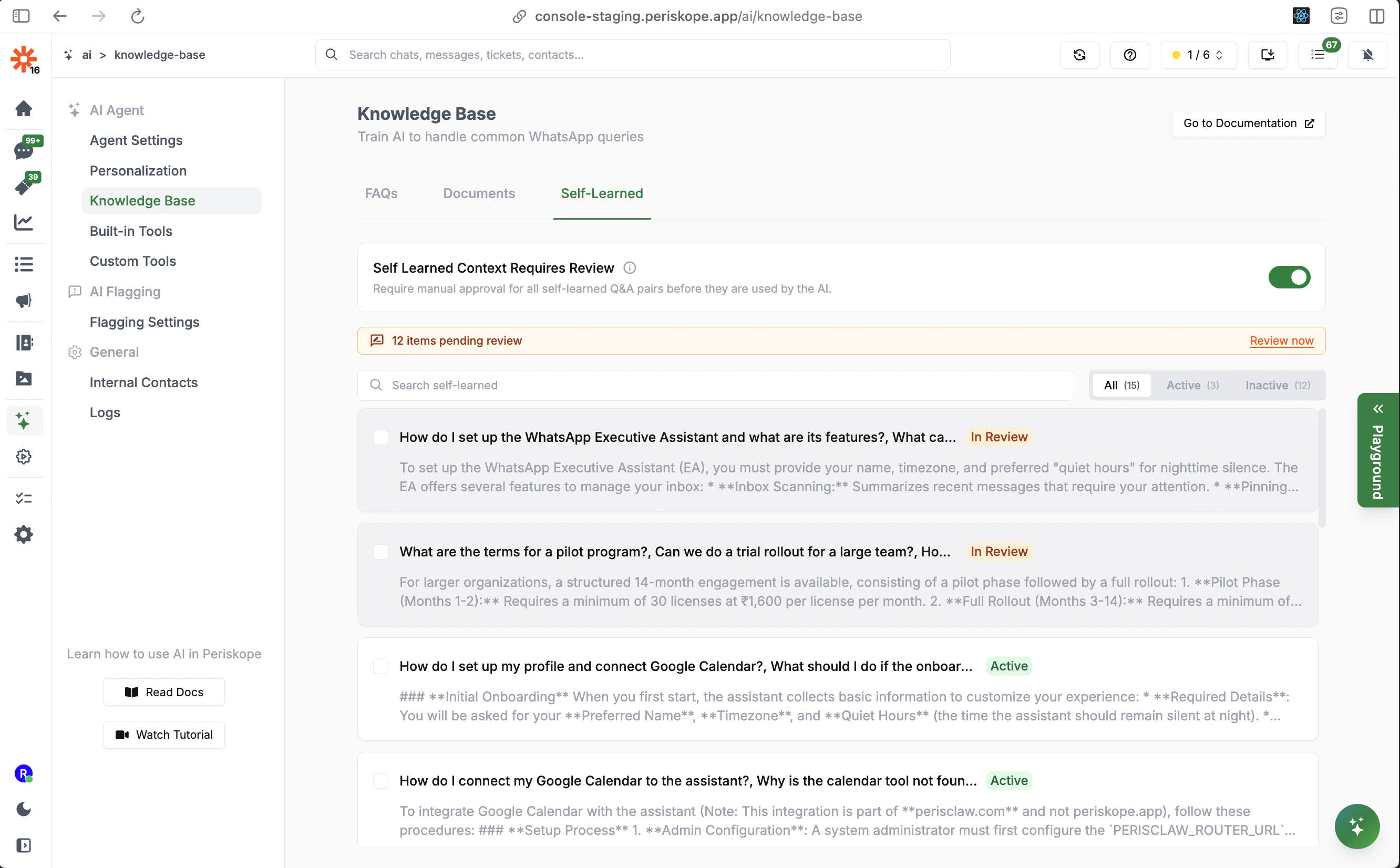
The AI Agent automatically learns from real conversations. When it observes team members answering questions in ongoing chats, it can extract those Q\&A pairs and add them to the knowledge base for future use.
This means your knowledge base improves over time without manual effort — every good answer your team gives becomes training data.
### Self Learned Context Requires Review
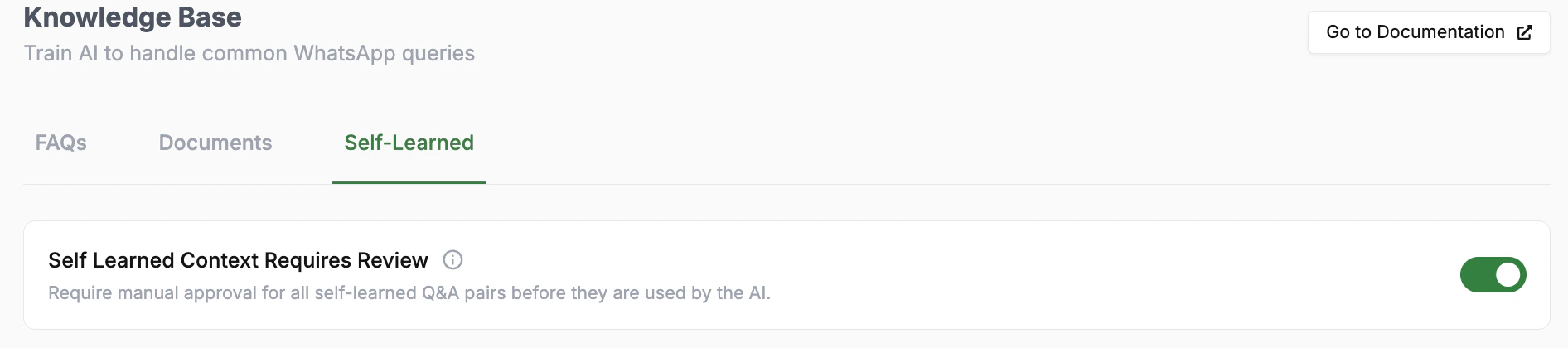
When this toggle is **on**, all self-learned Q\&A pairs are placed in a **pending review** queue before the AI can use them. You'll see items labeled **In Review** in the Self-Learned tab.
This is recommended when:
* You want tight quality control over what the AI learns
* Your team's responses may include information not appropriate for all customers
* You're in an early stage of AI deployment
When this toggle is **off**, the AI immediately uses self-learned context without manual approval. Suitable for mature deployments where your team consistently gives accurate, appropriate answers.
To review pending items, go to the **Self-Learned** tab and approve or reject each entry. Approved entries become **Active** and are used by the AI immediately.
***
## Knowledge Base Optimization Tips
**Quality over quantity.** Start with a small set of high-quality FAQs covering your most common questions. A well-written FAQ with good instructions outperforms ten vague ones.
**Test with real questions.** After adding FAQs, test them by sending actual customer questions through the AI and reviewing the responses in [Logs](/ai/agent/logs).
**Fill gaps over time.** Monitor AI conversations to identify questions the AI is handling poorly or escalating too often. Add or refine FAQs for those topics.
**Avoid conflicting content.** If multiple FAQ entries or documents cover the same topic with different answers, the AI may give inconsistent responses. Keep your knowledge base clean.
**Review self-learned entries regularly.** Self-learned context is valuable but requires curation. Schedule a regular review of pending entries to keep your knowledge base growing accurately.
## Next Steps
* [**Personalization**](/ai/agent/personalization) - Define the AI's role, personality, and instructions
* [**Built-in Tools**](/ai/agent/built-in-tools) - Configure what actions the AI can take
* [**Custom Tools**](/ai/agent/custom-tools) - Connect the AI to your own APIs
 There are three ways to train the AI:
| Method | Best For |
| ---------------- | ------------------------------------------------------------------- |
| **FAQs** | Specific questions with precise answers and behavioral instructions |
| **Documents** | Large bodies of reference content (product info, policies, guides) |
| **Self-Learned** | Q\&A pairs the AI discovers automatically from real conversations |
***
## FAQs
FAQs are essentially **prompts for the AI Agent**. Each FAQ entry has three components:
* **Question(s)**: The customer query — add multiple variations so the AI can match different phrasings
* **Answer**: The response the AI should provide
* **Instructions**: Special behavioral guidance for this specific FAQ (optional)
### Writing Effective Questions
Add multiple variations of the same question so the AI can identify it regardless of how customers phrase it:
```text theme={null}
How much does your service cost?
What are your pricing plans?
Can you tell me about your subscription fees?
How much does it cost per month?
```
The more variations you add, the more reliably the AI will match incoming questions to the right FAQ entry.
### Writing Effective Answers
Keep answers concise but complete. Use bullet points for multi-step or multi-item responses. Include links where relevant.
```text theme={null}
Our service has three tiers:
- Basic: $10/month — includes core features
- Pro: $25/month — includes advanced analytics and integrations
- Enterprise: Custom pricing — contact sales@company.com
```
### Using Instructions for Controlled Responses
The **Instructions** field lets you add behavioral rules specific to this FAQ — without affecting the rest of the AI's behavior.
**Basic instructions:**
```text theme={null}
Ask for the user's account email before providing specific account details.
```
**Conditional instructions:**
```text theme={null}
If the user mentions an error code, ask for a screenshot before troubleshooting.
If the user asks about pricing, confirm their region first.
```
**Multi-turn / escalation instructions:**
```text theme={null}
If they are facing issues adding a new user and appear to have hit their user limit,
explain that they may need to upgrade their plan. Ask if that's the case, and if so,
direct them to Settings > Manage Plans or notify the sales team to step in.
```
There are three ways to train the AI:
| Method | Best For |
| ---------------- | ------------------------------------------------------------------- |
| **FAQs** | Specific questions with precise answers and behavioral instructions |
| **Documents** | Large bodies of reference content (product info, policies, guides) |
| **Self-Learned** | Q\&A pairs the AI discovers automatically from real conversations |
***
## FAQs
FAQs are essentially **prompts for the AI Agent**. Each FAQ entry has three components:
* **Question(s)**: The customer query — add multiple variations so the AI can match different phrasings
* **Answer**: The response the AI should provide
* **Instructions**: Special behavioral guidance for this specific FAQ (optional)
### Writing Effective Questions
Add multiple variations of the same question so the AI can identify it regardless of how customers phrase it:
```text theme={null}
How much does your service cost?
What are your pricing plans?
Can you tell me about your subscription fees?
How much does it cost per month?
```
The more variations you add, the more reliably the AI will match incoming questions to the right FAQ entry.
### Writing Effective Answers
Keep answers concise but complete. Use bullet points for multi-step or multi-item responses. Include links where relevant.
```text theme={null}
Our service has three tiers:
- Basic: $10/month — includes core features
- Pro: $25/month — includes advanced analytics and integrations
- Enterprise: Custom pricing — contact sales@company.com
```
### Using Instructions for Controlled Responses
The **Instructions** field lets you add behavioral rules specific to this FAQ — without affecting the rest of the AI's behavior.
**Basic instructions:**
```text theme={null}
Ask for the user's account email before providing specific account details.
```
**Conditional instructions:**
```text theme={null}
If the user mentions an error code, ask for a screenshot before troubleshooting.
If the user asks about pricing, confirm their region first.
```
**Multi-turn / escalation instructions:**
```text theme={null}
If they are facing issues adding a new user and appear to have hit their user limit,
explain that they may need to upgrade their plan. Ask if that's the case, and if so,
direct them to Settings > Manage Plans or notify the sales team to step in.
```
 The AI Agent automatically learns from real conversations. When it observes team members answering questions in ongoing chats, it can extract those Q\&A pairs and add them to the knowledge base for future use.
This means your knowledge base improves over time without manual effort — every good answer your team gives becomes training data.
### Self Learned Context Requires Review
The AI Agent automatically learns from real conversations. When it observes team members answering questions in ongoing chats, it can extract those Q\&A pairs and add them to the knowledge base for future use.
This means your knowledge base improves over time without manual effort — every good answer your team gives becomes training data.
### Self Learned Context Requires Review
 When this toggle is **on**, all self-learned Q\&A pairs are placed in a **pending review** queue before the AI can use them. You'll see items labeled **In Review** in the Self-Learned tab.
This is recommended when:
* You want tight quality control over what the AI learns
* Your team's responses may include information not appropriate for all customers
* You're in an early stage of AI deployment
When this toggle is **off**, the AI immediately uses self-learned context without manual approval. Suitable for mature deployments where your team consistently gives accurate, appropriate answers.
To review pending items, go to the **Self-Learned** tab and approve or reject each entry. Approved entries become **Active** and are used by the AI immediately.
***
## Knowledge Base Optimization Tips
**Quality over quantity.** Start with a small set of high-quality FAQs covering your most common questions. A well-written FAQ with good instructions outperforms ten vague ones.
**Test with real questions.** After adding FAQs, test them by sending actual customer questions through the AI and reviewing the responses in [Logs](/ai/agent/logs).
**Fill gaps over time.** Monitor AI conversations to identify questions the AI is handling poorly or escalating too often. Add or refine FAQs for those topics.
**Avoid conflicting content.** If multiple FAQ entries or documents cover the same topic with different answers, the AI may give inconsistent responses. Keep your knowledge base clean.
**Review self-learned entries regularly.** Self-learned context is valuable but requires curation. Schedule a regular review of pending entries to keep your knowledge base growing accurately.
## Next Steps
* [**Personalization**](/ai/agent/personalization) - Define the AI's role, personality, and instructions
* [**Built-in Tools**](/ai/agent/built-in-tools) - Configure what actions the AI can take
* [**Custom Tools**](/ai/agent/custom-tools) - Connect the AI to your own APIs
When this toggle is **on**, all self-learned Q\&A pairs are placed in a **pending review** queue before the AI can use them. You'll see items labeled **In Review** in the Self-Learned tab.
This is recommended when:
* You want tight quality control over what the AI learns
* Your team's responses may include information not appropriate for all customers
* You're in an early stage of AI deployment
When this toggle is **off**, the AI immediately uses self-learned context without manual approval. Suitable for mature deployments where your team consistently gives accurate, appropriate answers.
To review pending items, go to the **Self-Learned** tab and approve or reject each entry. Approved entries become **Active** and are used by the AI immediately.
***
## Knowledge Base Optimization Tips
**Quality over quantity.** Start with a small set of high-quality FAQs covering your most common questions. A well-written FAQ with good instructions outperforms ten vague ones.
**Test with real questions.** After adding FAQs, test them by sending actual customer questions through the AI and reviewing the responses in [Logs](/ai/agent/logs).
**Fill gaps over time.** Monitor AI conversations to identify questions the AI is handling poorly or escalating too often. Add or refine FAQs for those topics.
**Avoid conflicting content.** If multiple FAQ entries or documents cover the same topic with different answers, the AI may give inconsistent responses. Keep your knowledge base clean.
**Review self-learned entries regularly.** Self-learned context is valuable but requires curation. Schedule a regular review of pending entries to keep your knowledge base growing accurately.
## Next Steps
* [**Personalization**](/ai/agent/personalization) - Define the AI's role, personality, and instructions
* [**Built-in Tools**](/ai/agent/built-in-tools) - Configure what actions the AI can take
* [**Custom Tools**](/ai/agent/custom-tools) - Connect the AI to your own APIs