> ## Documentation Index
> Fetch the complete documentation index at: https://docs.periskope.app/llms.txt
> Use this file to discover all available pages before exploring further.
# Self-Training
> Let the AI learn from your team's resolved chats every week, and review or re-run its training
Self-Training is a scheduled process that reviews your team's resolved conversations and drafts new Knowledge Base entries from them — so the AI keeps improving without anyone manually writing FAQs. Access it through **AI** > **Self-Training**.
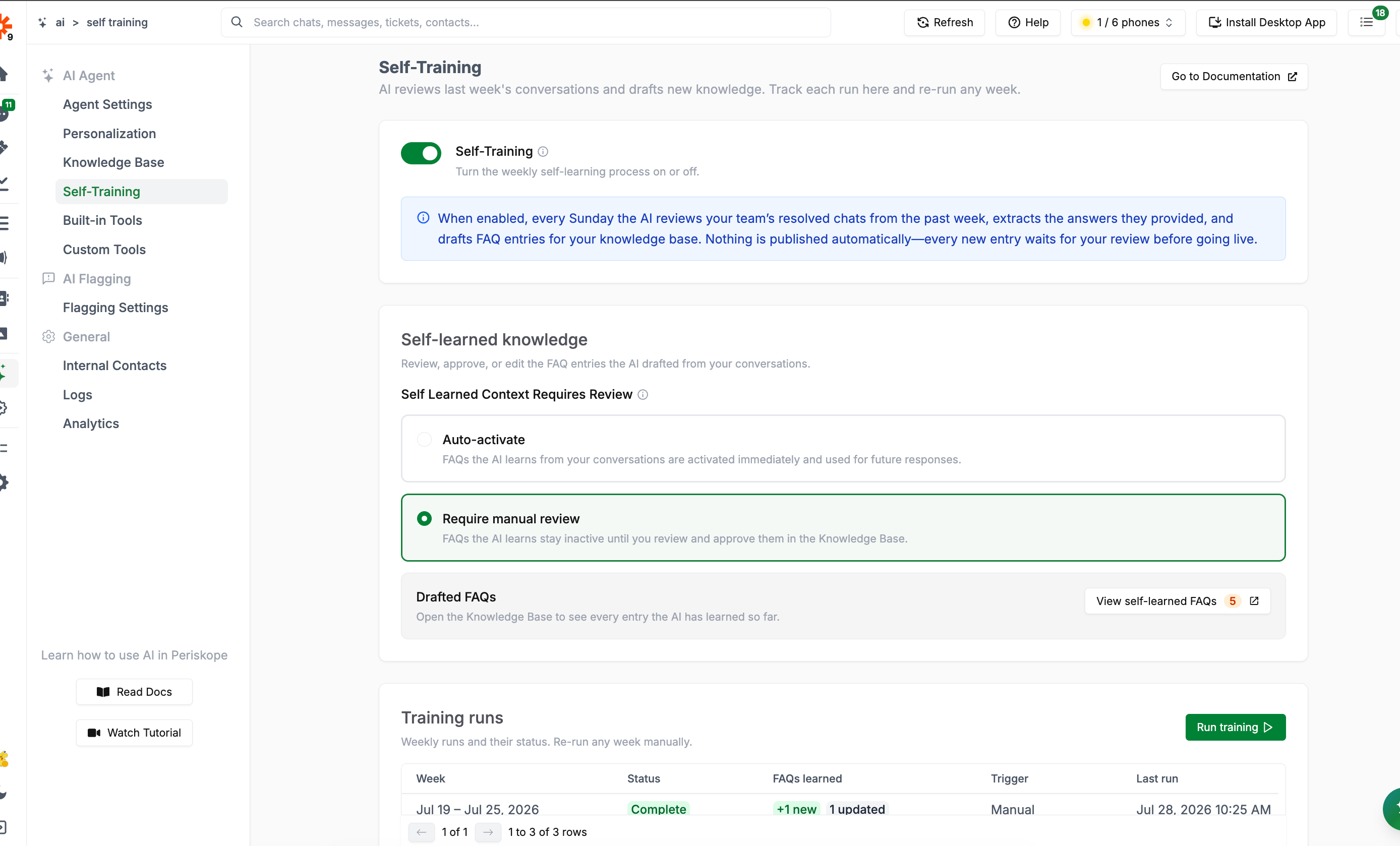 Self-Training is what powers the **Self-Learned** tab in the [Knowledge Base](/ai/agent/training#self-learned-context). This page controls the schedule, settings, and run history; the drafted entries themselves are reviewed inside the Knowledge Base.
## How It Works
When the **Self-Training** toggle is on, every **Sunday** the AI:
1. Reviews your team's resolved chats from the past week
2. Extracts the answers your team provided to customers
3. Drafts FAQ entries for your Knowledge Base from those answers
Nothing is published automatically — every new entry waits for review before it's used to answer customers, unless you've set entries to auto-activate (see below).
## Self-Learned Knowledge Settings
Under **Self Learned Context Requires Review**, choose how drafted FAQs behave once the AI creates them:
| Option | Behavior |
| ------------------------- | ---------------------------------------------------------------------------------------- |
| **Auto-activate** | FAQs the AI learns are activated immediately and used for future responses |
| **Require manual review** | FAQs the AI learns stay inactive until you review and approve them in the Knowledge Base |
This is the same setting described in [Self-Learned Context](/ai/agent/training#self-learned-context) — changing it here or in the Knowledge Base has the same effect.
The **Drafted FAQs** card shows how many entries are currently pending review, with a **View self-learned FAQs** shortcut straight to the filtered Knowledge Base list.
## Training Runs
The **Training runs** table is a history of every weekly run, plus any you've triggered manually:
| Column | Meaning |
| ---------------- | ------------------------------------------------------------------ |
| **Week** | The 7-day period the run processed |
| **Status** | Queued, In progress, Dispatched, Failed, or Complete |
| **FAQs learned** | New FAQs created and existing ones updated, once the run completes |
| **Trigger** | Scheduled (automatic Sunday run) or Manual |
| **Last run** | When the run was last dispatched or performed |
If a run fails, hover the status to see the error.
### Running Training Manually
Click **Run training** to process a specific week on demand — useful if you want fresh FAQs sooner than the next scheduled Sunday, or want to re-process a past week.
Self-Training is what powers the **Self-Learned** tab in the [Knowledge Base](/ai/agent/training#self-learned-context). This page controls the schedule, settings, and run history; the drafted entries themselves are reviewed inside the Knowledge Base.
## How It Works
When the **Self-Training** toggle is on, every **Sunday** the AI:
1. Reviews your team's resolved chats from the past week
2. Extracts the answers your team provided to customers
3. Drafts FAQ entries for your Knowledge Base from those answers
Nothing is published automatically — every new entry waits for review before it's used to answer customers, unless you've set entries to auto-activate (see below).
## Self-Learned Knowledge Settings
Under **Self Learned Context Requires Review**, choose how drafted FAQs behave once the AI creates them:
| Option | Behavior |
| ------------------------- | ---------------------------------------------------------------------------------------- |
| **Auto-activate** | FAQs the AI learns are activated immediately and used for future responses |
| **Require manual review** | FAQs the AI learns stay inactive until you review and approve them in the Knowledge Base |
This is the same setting described in [Self-Learned Context](/ai/agent/training#self-learned-context) — changing it here or in the Knowledge Base has the same effect.
The **Drafted FAQs** card shows how many entries are currently pending review, with a **View self-learned FAQs** shortcut straight to the filtered Knowledge Base list.
## Training Runs
The **Training runs** table is a history of every weekly run, plus any you've triggered manually:
| Column | Meaning |
| ---------------- | ------------------------------------------------------------------ |
| **Week** | The 7-day period the run processed |
| **Status** | Queued, In progress, Dispatched, Failed, or Complete |
| **FAQs learned** | New FAQs created and existing ones updated, once the run completes |
| **Trigger** | Scheduled (automatic Sunday run) or Manual |
| **Last run** | When the run was last dispatched or performed |
If a run fails, hover the status to see the error.
### Running Training Manually
Click **Run training** to process a specific week on demand — useful if you want fresh FAQs sooner than the next scheduled Sunday, or want to re-process a past week.
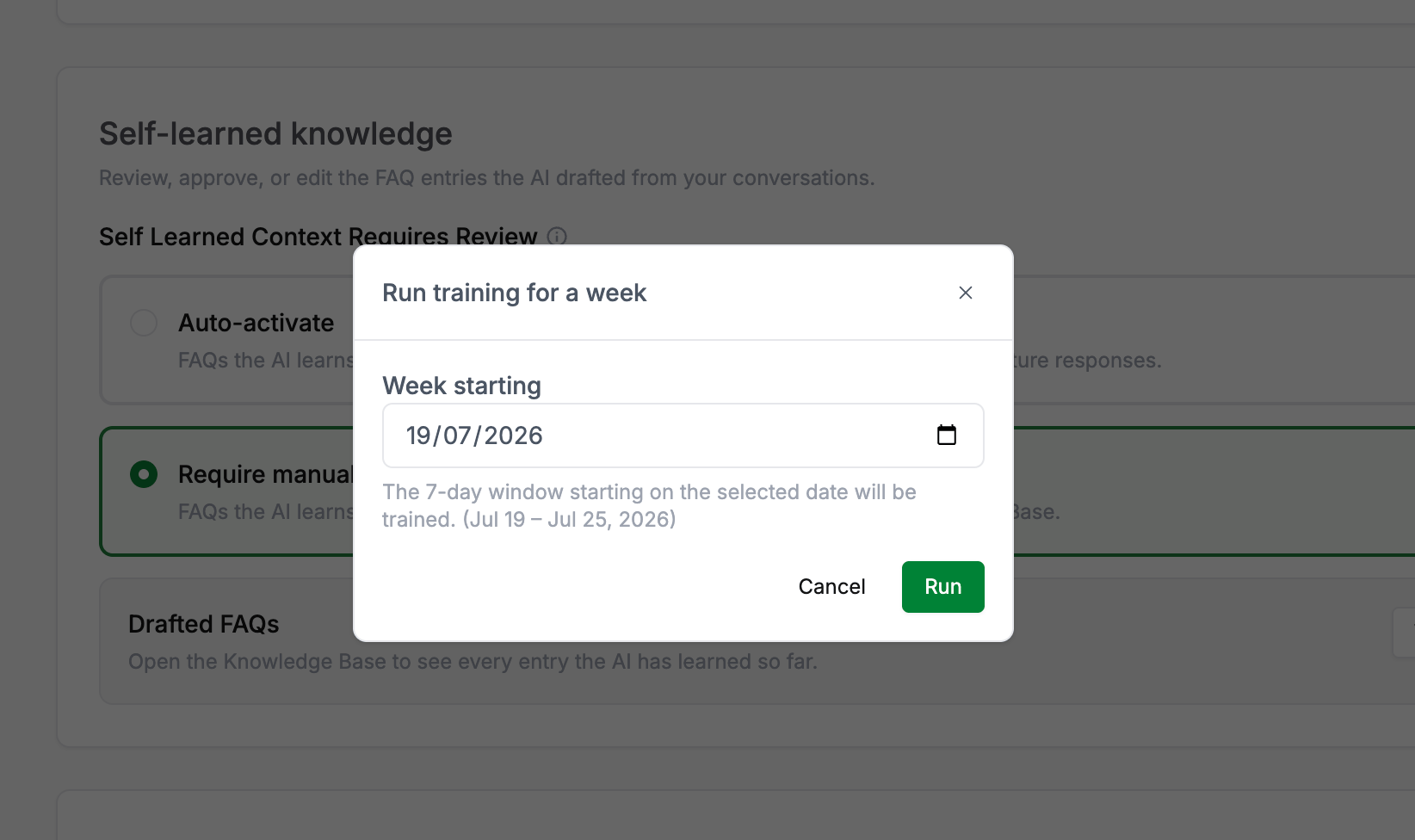 Pick the start date of the week you want processed (the AI trains on the 7-day window starting from that date) and submit. The **Run training** button is only enabled when Self-Training is turned on. If that week is already running, you'll be notified rather than starting a duplicate.
## Next Steps
* [**Knowledge Base**](/ai/agent/training) - Review, approve, and edit the FAQs Self-Training drafts
* [**Org Assistant**](/ai/agent/ai-assistant#keep-the-knowledge-base-up-to-date) - Ask the AI to audit your Knowledge Base for gaps, duplicates, and outdated entries
Pick the start date of the week you want processed (the AI trains on the 7-day window starting from that date) and submit. The **Run training** button is only enabled when Self-Training is turned on. If that week is already running, you'll be notified rather than starting a duplicate.
## Next Steps
* [**Knowledge Base**](/ai/agent/training) - Review, approve, and edit the FAQs Self-Training drafts
* [**Org Assistant**](/ai/agent/ai-assistant#keep-the-knowledge-base-up-to-date) - Ask the AI to audit your Knowledge Base for gaps, duplicates, and outdated entries