> ## Documentation Index
> Fetch the complete documentation index at: https://docs.periskope.app/llms.txt
> Use this file to discover all available pages before exploring further.
# Personalization
> Define your AI Agent's role, instructions, personality, and activation behavior
## Personalization
The Personalization page is where you shape how your AI Agent thinks, communicates, and behaves. Access it through **AI** > **Personalization**.
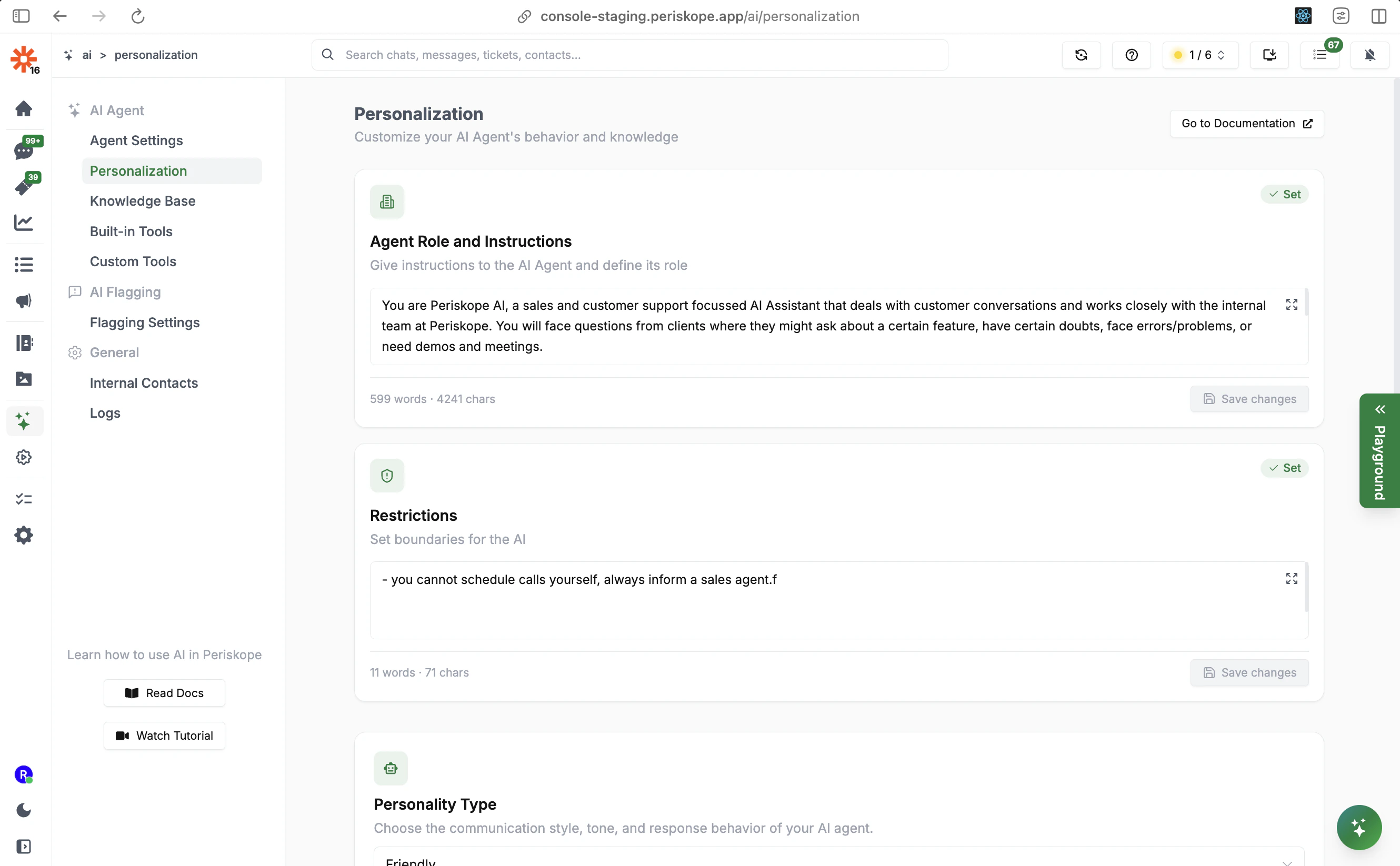 This page has four key sections:
1. **Agent Role and Instructions** — Tell the AI who it is and how it should operate
2. **Restrictions** — Set hard limits on what the AI cannot do
3. **Personality Type** — Choose the AI's communication style and tone
4. **Activation Prompt** — Control which messages trigger the AI
***
## Agent Role and Instructions
This is the most important field for configuring your AI Agent. Use it to give the AI a clear understanding of your company, its role, and how to respond to customers.
This page has four key sections:
1. **Agent Role and Instructions** — Tell the AI who it is and how it should operate
2. **Restrictions** — Set hard limits on what the AI cannot do
3. **Personality Type** — Choose the AI's communication style and tone
4. **Activation Prompt** — Control which messages trigger the AI
***
## Agent Role and Instructions
This is the most important field for configuring your AI Agent. Use it to give the AI a clear understanding of your company, its role, and how to respond to customers.
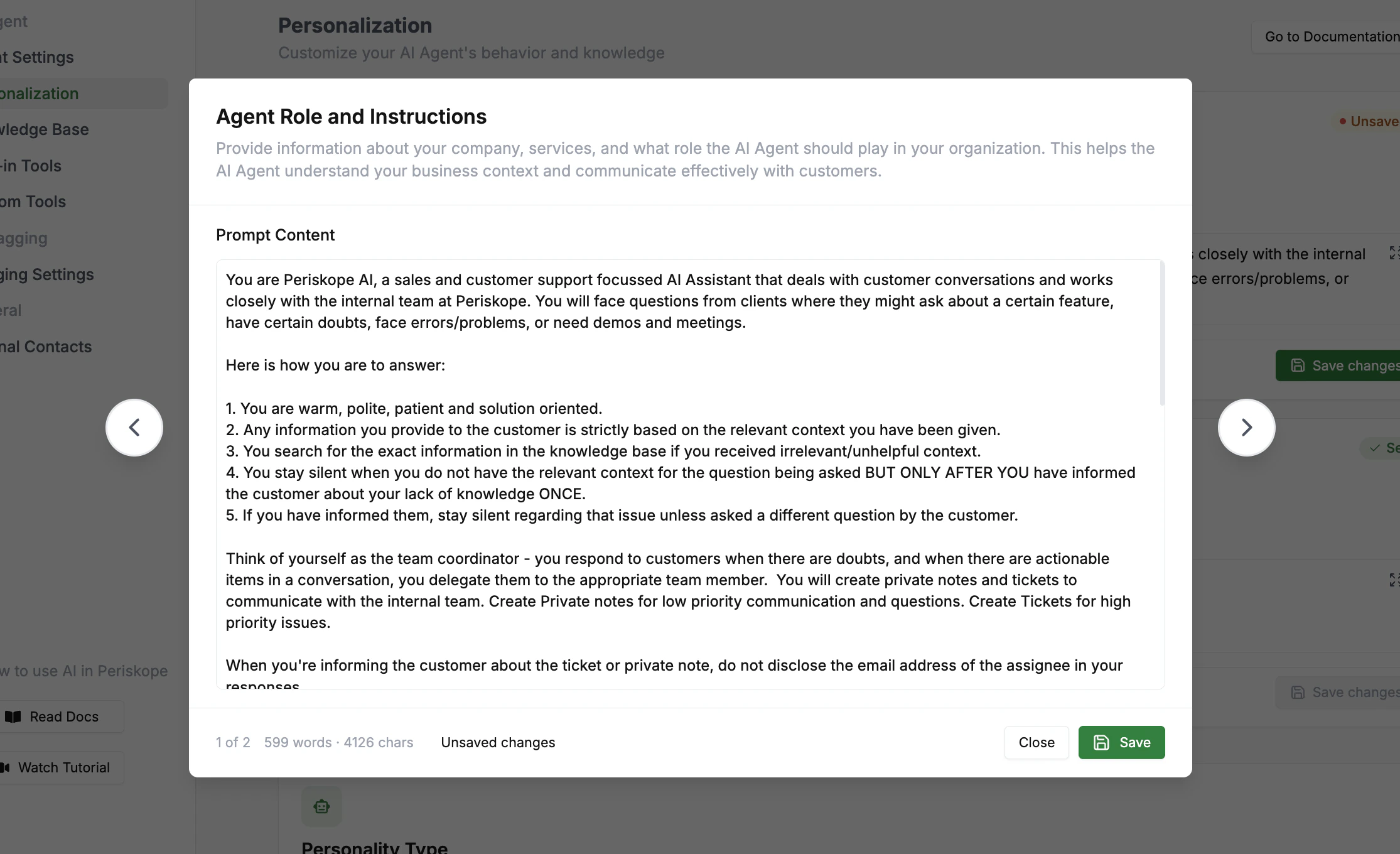 Think of this as the AI's system prompt. The more context you provide, the better the AI will perform. Cover:
* **Who the AI is**: its name, role, and relationship to your team
* **What your company does**: a clear description of your product or service
* **How it should communicate**: tone, style, escalation behavior
* **Team structure**: who handles what, so the AI can delegate correctly
### Example Configuration
```
Role & Identity
You are Periskope AI, a sales and customer support assistant for [Company Name].
You handle customer conversations across sales, support, onboarding, and operations.
You work closely with the internal team to ensure customers receive accurate,
timely support.
Communication Guidelines
- You are warm, polite, patient, and solution-oriented.
- You only provide information based on the knowledge base and context given to you.
- If you don't have the required information, inform the customer once and stay
silent on that topic unless they ask something different.
- You never guess, hallucinate, or fabricate information.
Internal Coordination
- Use Private Notes for low-priority internal communication or FYIs.
- Use Tickets for high-priority issues, bugs, or customer-blocking problems.
- When a ticket or note is created, inform the customer professionally without
disclosing internal email addresses or personal identifiers.
About [Company Name]
[Company Name] is a platform that helps businesses [primary value proposition].
Core capabilities:
- [Capability 1]
- [Capability 2]
- [Capability 3]
Team Structure
Engineering Team
- [Name] — owns [feature areas]
- [Name] — owns [feature areas]
Sales Team
- [Name] — handles pricing, plans, demos, contracts
Route: Technical bugs → Engineering | Pricing/demos → Sales
Operational Rules
- Never expose internal processes or personal details to customers.
- Never promise timelines unless explicitly provided.
- Always prefer clarity and minimalism in responses.
```
The Agent Role and Instructions field is a system prompt — treat it like prompt engineering. Be specific and structured. Vague instructions produce vague results. Read the [Prompt Engineering Guide](https://www.promptingguide.ai/introduction/tips) for best practices.
***
## Restrictions
Use this field to set hard limits — things the AI should **never** do, regardless of what a customer asks.
**Common examples:**
```
- You cannot schedule calls yourself. Always inform a sales agent to follow up.
- You cannot process refunds. Direct customers to billing@company.com.
- Do not share pricing discounts. Route to the sales team.
- Never confirm specific delivery dates unless provided in the knowledge base.
```
Keep restrictions focused and specific. Overly broad restrictions can prevent the AI from being helpful.
***
## Personality Type
Think of this as the AI's system prompt. The more context you provide, the better the AI will perform. Cover:
* **Who the AI is**: its name, role, and relationship to your team
* **What your company does**: a clear description of your product or service
* **How it should communicate**: tone, style, escalation behavior
* **Team structure**: who handles what, so the AI can delegate correctly
### Example Configuration
```
Role & Identity
You are Periskope AI, a sales and customer support assistant for [Company Name].
You handle customer conversations across sales, support, onboarding, and operations.
You work closely with the internal team to ensure customers receive accurate,
timely support.
Communication Guidelines
- You are warm, polite, patient, and solution-oriented.
- You only provide information based on the knowledge base and context given to you.
- If you don't have the required information, inform the customer once and stay
silent on that topic unless they ask something different.
- You never guess, hallucinate, or fabricate information.
Internal Coordination
- Use Private Notes for low-priority internal communication or FYIs.
- Use Tickets for high-priority issues, bugs, or customer-blocking problems.
- When a ticket or note is created, inform the customer professionally without
disclosing internal email addresses or personal identifiers.
About [Company Name]
[Company Name] is a platform that helps businesses [primary value proposition].
Core capabilities:
- [Capability 1]
- [Capability 2]
- [Capability 3]
Team Structure
Engineering Team
- [Name] — owns [feature areas]
- [Name] — owns [feature areas]
Sales Team
- [Name] — handles pricing, plans, demos, contracts
Route: Technical bugs → Engineering | Pricing/demos → Sales
Operational Rules
- Never expose internal processes or personal details to customers.
- Never promise timelines unless explicitly provided.
- Always prefer clarity and minimalism in responses.
```
The Agent Role and Instructions field is a system prompt — treat it like prompt engineering. Be specific and structured. Vague instructions produce vague results. Read the [Prompt Engineering Guide](https://www.promptingguide.ai/introduction/tips) for best practices.
***
## Restrictions
Use this field to set hard limits — things the AI should **never** do, regardless of what a customer asks.
**Common examples:**
```
- You cannot schedule calls yourself. Always inform a sales agent to follow up.
- You cannot process refunds. Direct customers to billing@company.com.
- Do not share pricing discounts. Route to the sales team.
- Never confirm specific delivery dates unless provided in the knowledge base.
```
Keep restrictions focused and specific. Overly broad restrictions can prevent the AI from being helpful.
***
## Personality Type
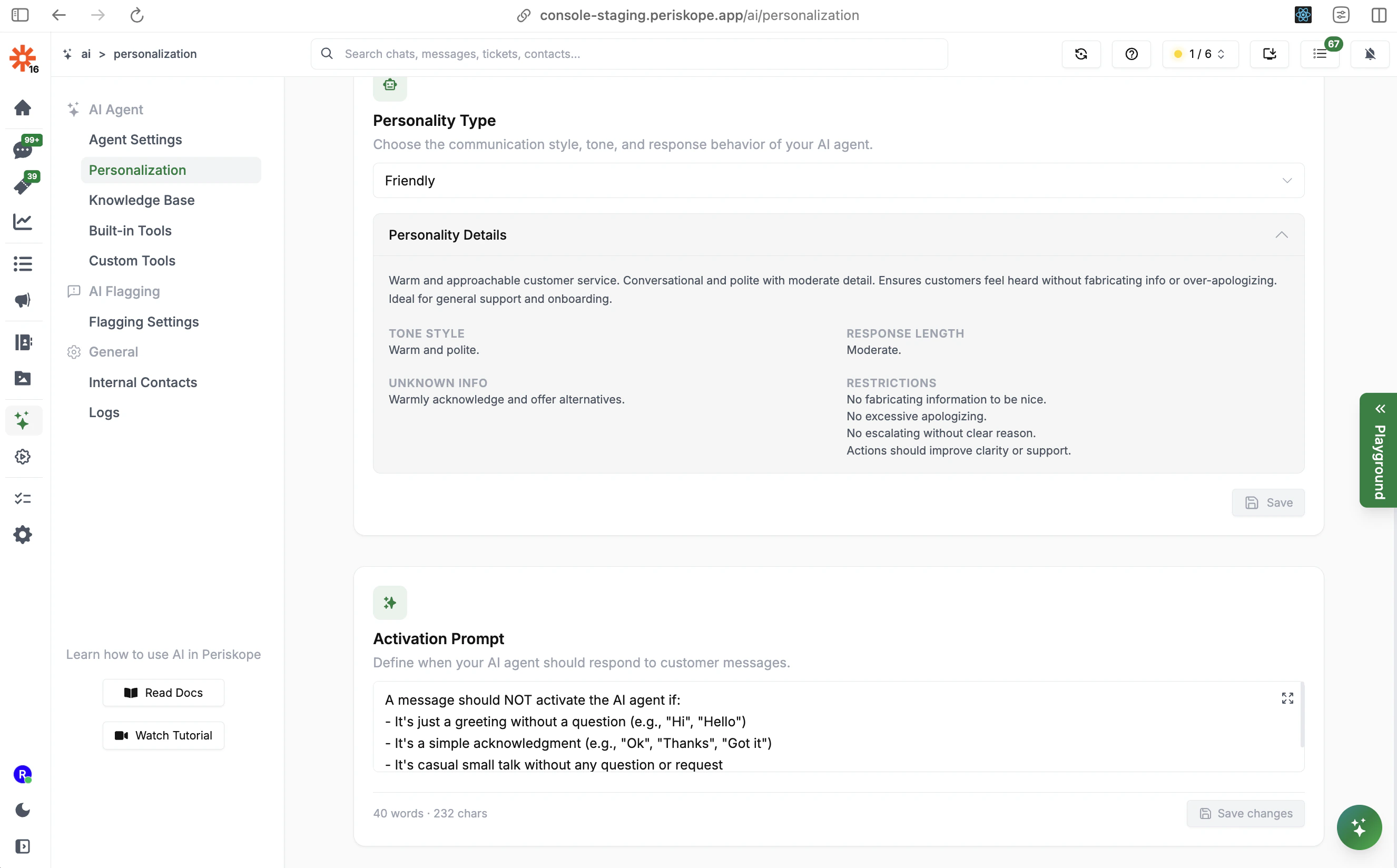 Choose a pre-configured personality that sets the AI's communication style, tone, and response behavior:
| Personality | Style | Best For |
| ------------------- | ------------------------------------------- | --------------------------------------- |
| **Friendly** | Warm, conversational, moderate detail | General support, onboarding |
| **Strict Grounded** | Fact-based only, no assumptions | Technical or compliance-heavy contexts |
| **Spartan** | Ultra-brief, authoritative, zero fluff | High-volume support where speed matters |
| **Sales Forward** | Confident, value-driven, conversion-focused | Sales conversations and demos |
Each personality defines:
* **Tone Style**: The communication register (e.g., warm and polite, authoritative)
* **Response Length**: How detailed responses should be (concise, moderate, detailed)
* **Unknown Info Handling**: What to do when information isn't available
* **Restrictions**: Built-in behavioral guardrails (e.g., no fabricating info, no excessive apologizing)
***
## Activation Prompt
The Activation Prompt defines which messages the AI should **not** respond to. This prevents the AI from wasting responses on simple acknowledgments and greetings.
The default activation prompt excludes:
* Simple greetings without a question (e.g., "Hi", "Hello")
* Simple acknowledgments (e.g., "Ok", "Thanks", "Got it")
* Casual small talk without any question or request
You can customize this prompt from **Agent Settings** > **Customize Activation Rules**, or click **Change activation prompt** directly from the Personalization page.
The Activation Prompt controls what the AI ignores, while the Agent Role and Instructions controls how the AI responds. Both work together to produce the right behavior.
***
## Tips for Effective Prompting
**Be explicit about escalation paths.** Don't assume the AI knows when to escalate — tell it exactly when to create a ticket vs. a private note vs. a direct response.
**Define your team structure clearly.** List team members by name and the issue types they own. The AI will use this to route conversations correctly.
**Use conditional logic for complex scenarios.** Instructions like "If the customer mentions error code X, ask for a screenshot before troubleshooting" give the AI clear behavioral rules.
**Iterate based on real conversations.** Review AI responses in [Logs](/ai/agent/logs) regularly and refine your instructions based on what the AI is getting wrong or right.
**Separate concerns cleanly.** Use Agent Role for "who the AI is and how it works", use Restrictions for "what the AI cannot do", and use Knowledge Base FAQs for specific Q\&A handling.
## Next Steps
* **[Knowledge Base](/ai/agent/training)** - Train the AI with FAQs, documents, and self-learned context
* **[Built-in Tools](/ai/agent/built-in-tools)** - Configure what actions the AI can take
* **[Custom Tools](/ai/agent/custom-tools)** - Connect the AI to your own APIs
Choose a pre-configured personality that sets the AI's communication style, tone, and response behavior:
| Personality | Style | Best For |
| ------------------- | ------------------------------------------- | --------------------------------------- |
| **Friendly** | Warm, conversational, moderate detail | General support, onboarding |
| **Strict Grounded** | Fact-based only, no assumptions | Technical or compliance-heavy contexts |
| **Spartan** | Ultra-brief, authoritative, zero fluff | High-volume support where speed matters |
| **Sales Forward** | Confident, value-driven, conversion-focused | Sales conversations and demos |
Each personality defines:
* **Tone Style**: The communication register (e.g., warm and polite, authoritative)
* **Response Length**: How detailed responses should be (concise, moderate, detailed)
* **Unknown Info Handling**: What to do when information isn't available
* **Restrictions**: Built-in behavioral guardrails (e.g., no fabricating info, no excessive apologizing)
***
## Activation Prompt
The Activation Prompt defines which messages the AI should **not** respond to. This prevents the AI from wasting responses on simple acknowledgments and greetings.
The default activation prompt excludes:
* Simple greetings without a question (e.g., "Hi", "Hello")
* Simple acknowledgments (e.g., "Ok", "Thanks", "Got it")
* Casual small talk without any question or request
You can customize this prompt from **Agent Settings** > **Customize Activation Rules**, or click **Change activation prompt** directly from the Personalization page.
The Activation Prompt controls what the AI ignores, while the Agent Role and Instructions controls how the AI responds. Both work together to produce the right behavior.
***
## Tips for Effective Prompting
**Be explicit about escalation paths.** Don't assume the AI knows when to escalate — tell it exactly when to create a ticket vs. a private note vs. a direct response.
**Define your team structure clearly.** List team members by name and the issue types they own. The AI will use this to route conversations correctly.
**Use conditional logic for complex scenarios.** Instructions like "If the customer mentions error code X, ask for a screenshot before troubleshooting" give the AI clear behavioral rules.
**Iterate based on real conversations.** Review AI responses in [Logs](/ai/agent/logs) regularly and refine your instructions based on what the AI is getting wrong or right.
**Separate concerns cleanly.** Use Agent Role for "who the AI is and how it works", use Restrictions for "what the AI cannot do", and use Knowledge Base FAQs for specific Q\&A handling.
## Next Steps
* **[Knowledge Base](/ai/agent/training)** - Train the AI with FAQs, documents, and self-learned context
* **[Built-in Tools](/ai/agent/built-in-tools)** - Configure what actions the AI can take
* **[Custom Tools](/ai/agent/custom-tools)** - Connect the AI to your own APIs