> ## Documentation Index
> Fetch the complete documentation index at: https://docs.periskope.app/llms.txt
> Use this file to discover all available pages before exploring further.
# Built-in Tools
> Configure the built-in actions your AI Agent can take in conversations
## Built-in Tools
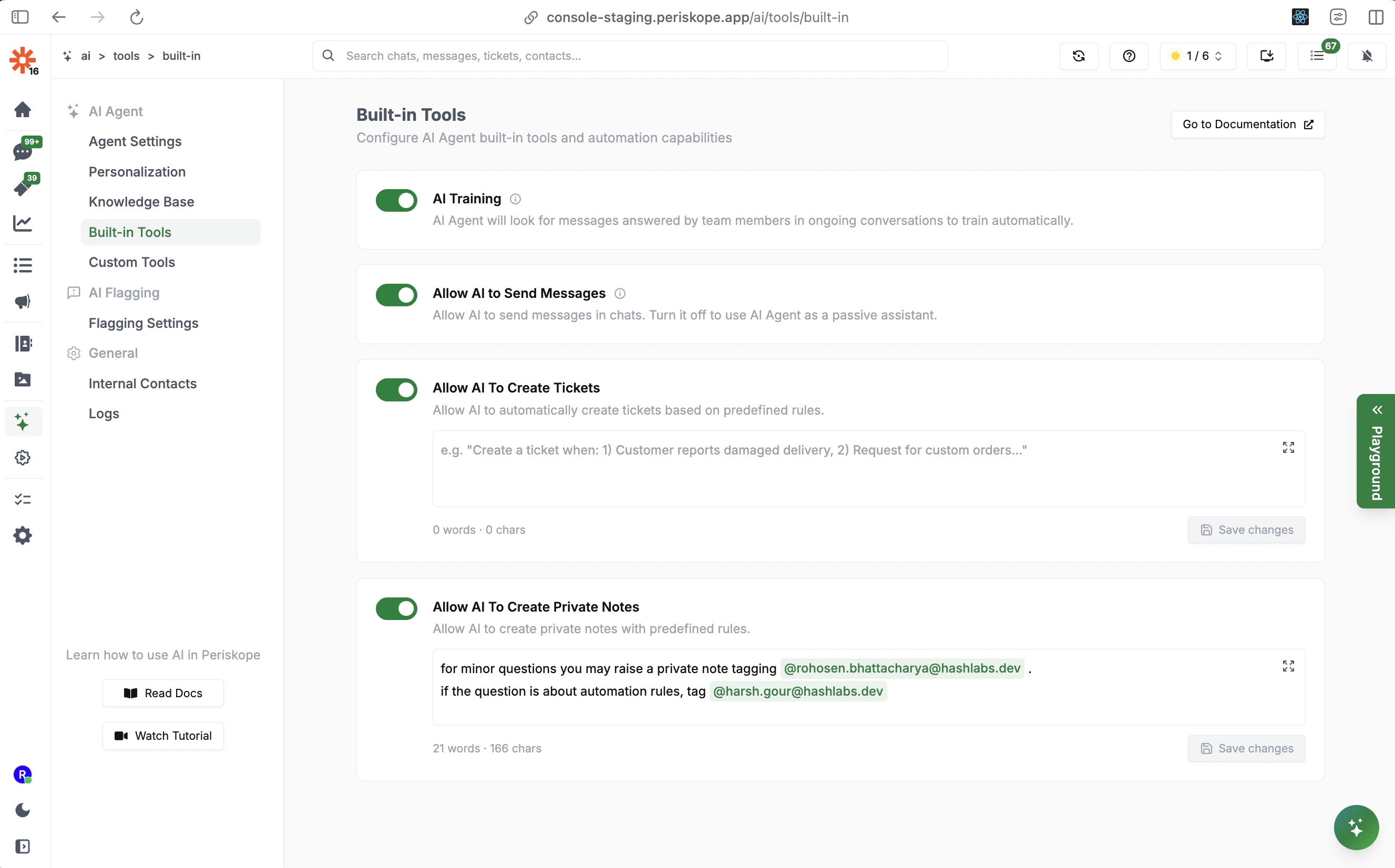
Built-in Tools are actions the AI Agent can take natively within Periskope — no external API required. Access them through **AI** > **Built-in Tools**.
Each tool can be toggled on or off independently. When a tool is enabled, the AI will use it autonomously based on conversation context and the rules you configure.
***
## AI Training
When enabled, the AI will look for messages answered by team members in ongoing conversations and use them to train itself automatically.
This feeds directly into the [Self-Learned](/ai/agent/training#self-learned-context) tab in the Knowledge Base. If **Self Learned Context Requires Review** is on in Agent Settings, these entries will appear as pending until you approve them.
***
## Allow AI to Send Messages
Controls whether the AI Agent can send messages directly in chats.
* **On**: The AI actively responds to customers
* **Off**: The AI operates as a **passive assistant** — it processes conversations and may create internal notes or tickets, but will not send any customer-facing messages
Use the passive mode if you want AI assistance for your team (e.g., auto-creating tickets or summarizing context) without having it talk directly to customers.
***
## Allow AI to Create Tickets
When enabled, the AI can automatically create tickets based on predefined rules.
You define the rules in plain language directly in the tool's text field. The AI reads this rule when deciding whether to raise a ticket.
**Example rules:**
```text theme={null}
Create a ticket when:
1) Customer reports a damaged delivery
2) Request for custom orders
3) Customer reports a payment failure or billing issue
```
Be specific about the conditions. The AI uses this rule as a prompt, so precise instructions like "create a ticket when the customer reports they cannot log in after 3 attempts" work better than "create tickets for login issues".
***
## Allow AI to Create Private Notes
When enabled, the AI can create private notes visible only to your internal team — not to customers.
Use this to have the AI:
* Flag conversations that need human follow-up
* Summarize context for a team member being handed a conversation
* Tag specific team members when their attention is needed
**Example rules:**
```text theme={null}
For minor questions, you may raise a private note tagging @rohosen.bhattacharya@hashlabs.dev.
If the question is about automation rules, tag @harsh.gour@hashlabs.dev.
```
The AI uses these rules as instructions for when and how to create private notes, including who to tag.
***
## How Tools Work Together
The AI's built-in tools work in combination. A typical flow might be:
1. Customer asks about a delivery issue
2. AI uses its **Knowledge Base** to provide an initial response
3. AI determines the issue requires escalation based on your ticket rules
4. AI **creates a ticket** and tags the relevant team member via a **private note**
5. AI informs the customer that their issue has been escalated
All of this happens autonomously, based on the rules you configure.
## Next Steps
* [**Custom Tools**](/ai/agent/custom-tools) - Connect the AI to your own APIs for real-time data lookups
* [**Knowledge Base**](/ai/agent/training) - Train the AI with FAQs and documents
* [**Personalization**](/ai/agent/personalization) - Define the AI's role and escalation behavior
 Each tool can be toggled on or off independently. When a tool is enabled, the AI will use it autonomously based on conversation context and the rules you configure.
***
## AI Training
When enabled, the AI will look for messages answered by team members in ongoing conversations and use them to train itself automatically.
This feeds directly into the [Self-Learned](/ai/agent/training#self-learned-context) tab in the Knowledge Base. If **Self Learned Context Requires Review** is on in Agent Settings, these entries will appear as pending until you approve them.
***
## Allow AI to Send Messages
Controls whether the AI Agent can send messages directly in chats.
* **On**: The AI actively responds to customers
* **Off**: The AI operates as a **passive assistant** — it processes conversations and may create internal notes or tickets, but will not send any customer-facing messages
Use the passive mode if you want AI assistance for your team (e.g., auto-creating tickets or summarizing context) without having it talk directly to customers.
***
## Allow AI to Create Tickets
When enabled, the AI can automatically create tickets based on predefined rules.
You define the rules in plain language directly in the tool's text field. The AI reads this rule when deciding whether to raise a ticket.
**Example rules:**
```text theme={null}
Create a ticket when:
1) Customer reports a damaged delivery
2) Request for custom orders
3) Customer reports a payment failure or billing issue
```
Each tool can be toggled on or off independently. When a tool is enabled, the AI will use it autonomously based on conversation context and the rules you configure.
***
## AI Training
When enabled, the AI will look for messages answered by team members in ongoing conversations and use them to train itself automatically.
This feeds directly into the [Self-Learned](/ai/agent/training#self-learned-context) tab in the Knowledge Base. If **Self Learned Context Requires Review** is on in Agent Settings, these entries will appear as pending until you approve them.
***
## Allow AI to Send Messages
Controls whether the AI Agent can send messages directly in chats.
* **On**: The AI actively responds to customers
* **Off**: The AI operates as a **passive assistant** — it processes conversations and may create internal notes or tickets, but will not send any customer-facing messages
Use the passive mode if you want AI assistance for your team (e.g., auto-creating tickets or summarizing context) without having it talk directly to customers.
***
## Allow AI to Create Tickets
When enabled, the AI can automatically create tickets based on predefined rules.
You define the rules in plain language directly in the tool's text field. The AI reads this rule when deciding whether to raise a ticket.
**Example rules:**
```text theme={null}
Create a ticket when:
1) Customer reports a damaged delivery
2) Request for custom orders
3) Customer reports a payment failure or billing issue
```