> ## Documentation Index
> Fetch the complete documentation index at: https://docs.periskope.app/llms.txt
> Use this file to discover all available pages before exploring further.
# AI Dictate
What if you didn't have to type a single word to manage your customer conversations? Periskope lets you do everything with just your voice — from crafting replies to running actions across your workspace.
***
## Dictation Mode in the Chat
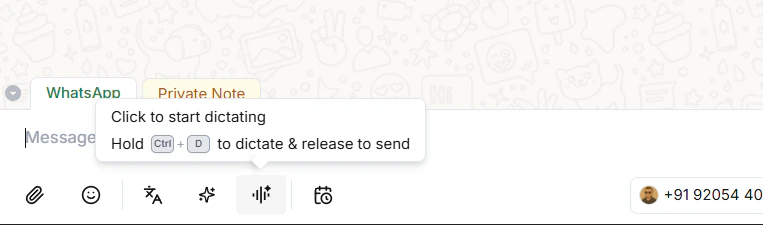
When you're inside a chat and want to send a reply, click the **dictation button** to start recording — and click it again when you're done. You can also use the keyboard shortcut **Ctrl+D** on Windows or **Cmd+D** on Mac.
The AI has the full context of the conversation. It listens to what you say, understands the situation, and crafts a response for you — ready to send.
### How it works
1. Open any chat
2. Click the **dictation button** to start recording (or press **Ctrl+D** / **Cmd+D**)
3. Speak your instruction — for example:
```text theme={null}
Tell them about our pricing plans and ask if they'd like to book a demo.
```
4. Click the dictation button again to stop recording
5. The AI generates a reply based on your instruction and the conversation context
6. Want to refine it? Click the dictation button again and say:
```text theme={null}
Make the tone more formal.
```
7. The message updates instantly — review and hit send
No typing. No copy pasting. Just speak, review, and send.
> **Tip:** You don't need to dictate the exact reply word for word — just tell the AI what you want to communicate and it handles the wording for you.
***
## Voice with the Org Assistant
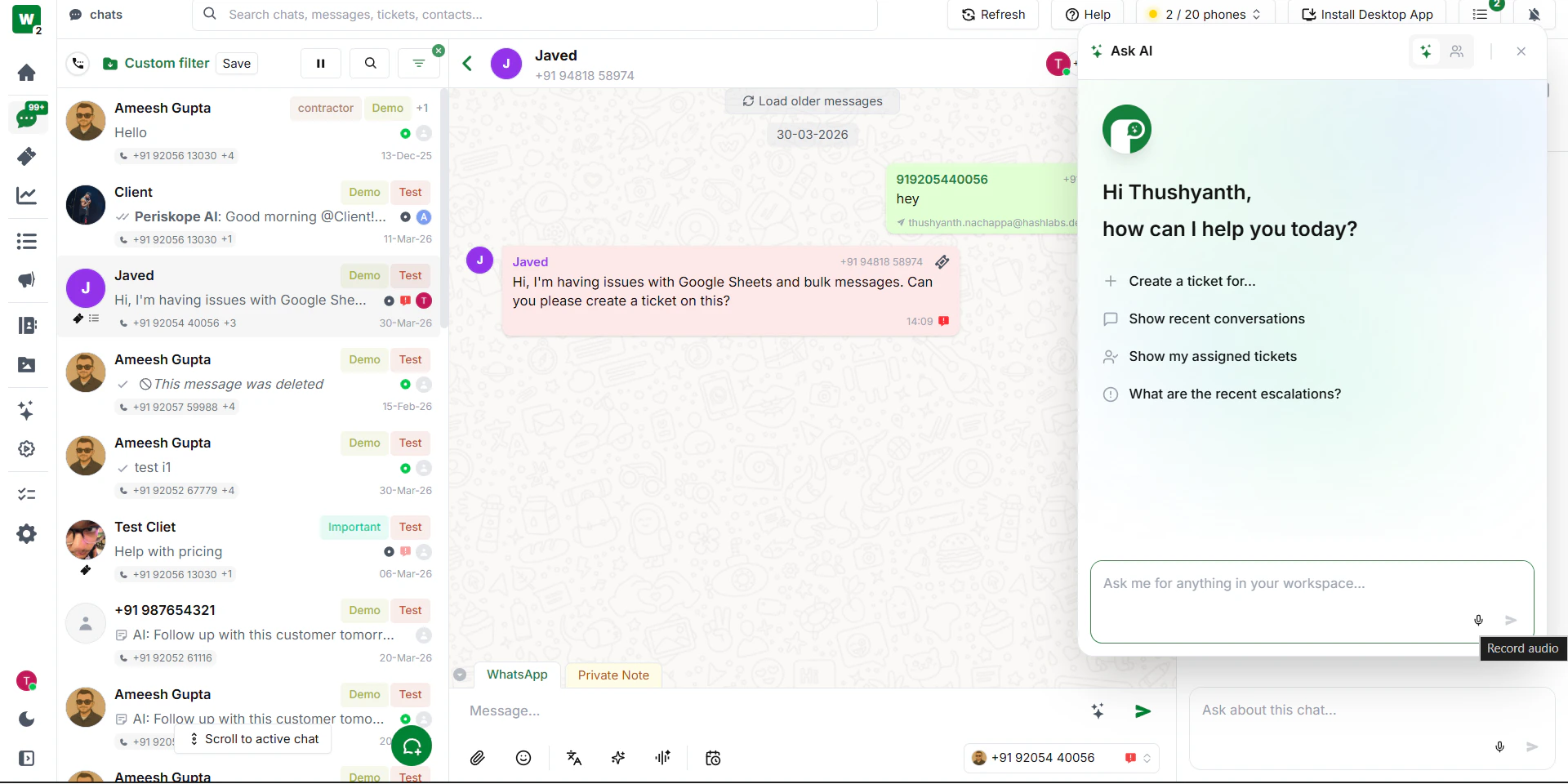
The same voice feature works with the Org Assistant too. Instead of typing your instructions, just click the **microphone icon** in the Org Assistant panel and speak.
### How it works
1. Open the Org Assistant from the bottom-right corner of any page
2. Click the **microphone icon**
3. Speak your instruction — for example:
```text theme={null}
How many unread chats do I have today?
```
4. Review what was transcribed
5. Click **Send** — it's done instantly
Any action you'd normally type to the Org Assistant, you can now just say out loud.
***
## Voice with the Chat Assistant
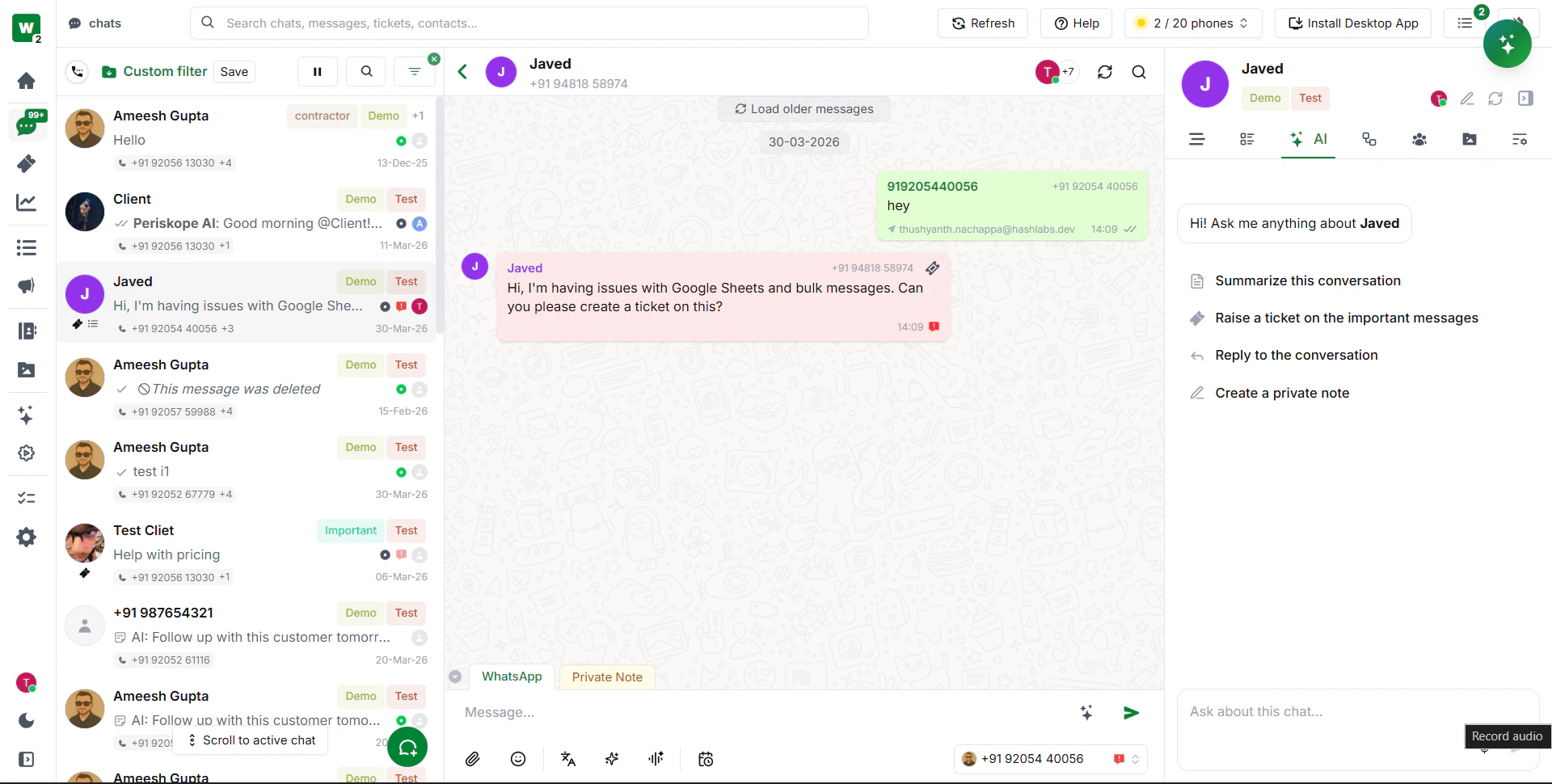
You can use voice with the Chat Assistant as well. Open any chat, click the microphone in the Chat Assistant panel, and ask anything about that conversation — without typing a single word.
### How it works
1. Open a chat and go to the **AI tab** in the right panel
2. Click the **microphone icon**
3. Ask anything about the conversation — for example:
```text theme={null}
Summarise this conversation.
```
```text theme={null}
What's the sentiment of this chat?
```
```text theme={null}
What are the most important messages here?
```
4. The assistant responds instantly based on the chat context
***
## Why This Matters
Your team moves faster when they're not stuck typing. With voice, everything just flows — whether it's managing your workspace or crafting the perfect reply, you can do it all hands-free.
***
 The AI has the full context of the conversation. It listens to what you say, understands the situation, and crafts a response for you — ready to send.
### How it works
1. Open any chat
2. Click the **dictation button** to start recording (or press **Ctrl+D** / **Cmd+D**)
3. Speak your instruction — for example:
```text theme={null}
Tell them about our pricing plans and ask if they'd like to book a demo.
```
4. Click the dictation button again to stop recording
5. The AI generates a reply based on your instruction and the conversation context
6. Want to refine it? Click the dictation button again and say:
```text theme={null}
Make the tone more formal.
```
7. The message updates instantly — review and hit send
No typing. No copy pasting. Just speak, review, and send.
> **Tip:** You don't need to dictate the exact reply word for word — just tell the AI what you want to communicate and it handles the wording for you.
***
## Voice with the Org Assistant
The same voice feature works with the Org Assistant too. Instead of typing your instructions, just click the **microphone icon** in the Org Assistant panel and speak.
The AI has the full context of the conversation. It listens to what you say, understands the situation, and crafts a response for you — ready to send.
### How it works
1. Open any chat
2. Click the **dictation button** to start recording (or press **Ctrl+D** / **Cmd+D**)
3. Speak your instruction — for example:
```text theme={null}
Tell them about our pricing plans and ask if they'd like to book a demo.
```
4. Click the dictation button again to stop recording
5. The AI generates a reply based on your instruction and the conversation context
6. Want to refine it? Click the dictation button again and say:
```text theme={null}
Make the tone more formal.
```
7. The message updates instantly — review and hit send
No typing. No copy pasting. Just speak, review, and send.
> **Tip:** You don't need to dictate the exact reply word for word — just tell the AI what you want to communicate and it handles the wording for you.
***
## Voice with the Org Assistant
The same voice feature works with the Org Assistant too. Instead of typing your instructions, just click the **microphone icon** in the Org Assistant panel and speak.
 ### How it works
1. Open the Org Assistant from the bottom-right corner of any page
2. Click the **microphone icon**
3. Speak your instruction — for example:
```text theme={null}
How many unread chats do I have today?
```
4. Review what was transcribed
5. Click **Send** — it's done instantly
Any action you'd normally type to the Org Assistant, you can now just say out loud.
***
## Voice with the Chat Assistant
You can use voice with the Chat Assistant as well. Open any chat, click the microphone in the Chat Assistant panel, and ask anything about that conversation — without typing a single word.
### How it works
1. Open the Org Assistant from the bottom-right corner of any page
2. Click the **microphone icon**
3. Speak your instruction — for example:
```text theme={null}
How many unread chats do I have today?
```
4. Review what was transcribed
5. Click **Send** — it's done instantly
Any action you'd normally type to the Org Assistant, you can now just say out loud.
***
## Voice with the Chat Assistant
You can use voice with the Chat Assistant as well. Open any chat, click the microphone in the Chat Assistant panel, and ask anything about that conversation — without typing a single word.
 ### How it works
1. Open a chat and go to the **AI tab** in the right panel
2. Click the **microphone icon**
3. Ask anything about the conversation — for example:
```text theme={null}
Summarise this conversation.
```
```text theme={null}
What's the sentiment of this chat?
```
```text theme={null}
What are the most important messages here?
```
4. The assistant responds instantly based on the chat context
***
## Why This Matters
Your team moves faster when they're not stuck typing. With voice, everything just flows — whether it's managing your workspace or crafting the perfect reply, you can do it all hands-free.
***
### How it works
1. Open a chat and go to the **AI tab** in the right panel
2. Click the **microphone icon**
3. Ask anything about the conversation — for example:
```text theme={null}
Summarise this conversation.
```
```text theme={null}
What's the sentiment of this chat?
```
```text theme={null}
What are the most important messages here?
```
4. The assistant responds instantly based on the chat context
***
## Why This Matters
Your team moves faster when they're not stuck typing. With voice, everything just flows — whether it's managing your workspace or crafting the perfect reply, you can do it all hands-free.
***